Learning and Development Insights on Internet-Shared Supply Chain Management Software Using Access and SQL Server (English Version)
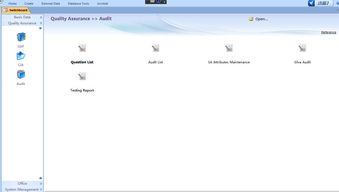
In the realm of enterprise software, developing a Supply Chain Management (SCM) system that is internet-shared, built on a hybrid database architecture of Microsoft Access and SQL Server, and presented in an English-language interface presents a unique and challenging project. This endeavor blends desktop application agility with robust server capabilities, aiming for global accessibility. Here are key learnings and development insights from such an undertaking.
1. Architectural Strategy: The Access-SQL Server Hybrid Model
The core technical decision is the database architecture. Using Access as a front-end/client application and SQL Server as the back-end data repository leverages the strengths of both. Access provides rapid form and report development, a user-friendly interface for configuration, and local caching capabilities. SQL Server offers industrial-strength data security, integrity, transaction management, and superior performance for concurrent access over the internet. The linkage is typically established via ODBC (Open Database Connectivity) or Linked Tables, allowing the Access front-end to execute queries and updates directly on the remote SQL Server database.
- Development Insight: Meticulously design the SQL Server database schema first (tables, relationships, stored procedures). Use Access primarily for UI, business logic that doesn't require heavy server processing, and temporary local data storage. This separation ensures scalability and centralizes critical data management on the server.
2. Enabling Secure Internet Sharing
Making the system "internet-shared" is the primary challenge. Directly exposing SQL Server ports to the public internet is a severe security risk.
- Key Solutions & Learnings:
- VPN (Virtual Private Network): The most secure method. All users connect via a corporate VPN, treating the SQL Server as if it's on a local network. This simplifies connectivity but requires VPN management.
- Terminal Services / Remote Desktop: Host the Access front-end on a terminal server (e.g., Windows Server with RDS). Users connect via Remote Desktop to use the application. This centralizes deployment and control but can have performance limitations with graphics.
- Web Service Layer: Develop a middle-tier (using ASP.NET, Node.js, etc.) that exposes secure API endpoints. The Access application (or a rebuilt lightweight client) communicates with these web services, which in turn interact with SQL Server. This is the most modern and secure architecture for internet access, effectively insulating the database.
- Persistent Insight: Security is paramount. Always use strong authentication, encrypt connection strings, employ SSL/TLS for data in transit, and implement role-based access control within the application.
3. Development for an English-Language System
Developing for an international English-speaking user base requires more than just interface translation.
- Learning Points:
- Internationalization (i18n) from the Start: Design all tables to support Unicode (e.g.,
NVARCHARin SQL Server). Never assume a single character set.
- Cultural Neutrality in Design: Dates (
MM/DD/YYYYvs.DD/MM/YYYY), number formats, address fields, and even color connotations must be considered. Use locale-aware formatting functions.
- Consistent Terminology: Maintain a project glossary for key SCM terms (e.g., Purchase Order, Bill of Lading, ASN) to ensure consistency across forms, reports, and messages.
- Error Messages: All user-facing messages, alerts, and logs must be clear, actionable, and in plain English. Avoid technical jargon.
4. Software Development Practices & Challenges
Version Control & Collaboration: Even with Access, use source control (like Git) for the front-end VBA code, forms, and reports. For SQL Server, script everything (schema, stored procedures) and manage it in a repository. This is non-negotiable for team development.
Performance Optimization: Over a potentially high-latency internet connection, performance is critical. Optimize by:
* Using stored procedures in SQL Server to minimize network traffic and leverage server-side execution.
- Implementing pagination for large data sets instead of loading all records.
- Designing efficient queries and ensuring proper indexing on the SQL Server.
- Using local Access tables for static, read-only reference data to reduce frequent server calls.
- Deployment and Updates: Updating an internet-shared Access client is difficult. Strategies include:
- A central launch script that checks for and downloads the latest front-end file.
- Moving core logic to the server-side (stored procedures or web services), making the client thinner and less update-sensitive.
- The aforementioned Terminal Server method, where updates are made once on the host.
5. Reflection and Future Direction
While the Access-SQL Server hybrid is a viable and cost-effective path for certain scenarios, this project highlights its limitations for a truly global, internet-scale SCM system. The complexity of secure remote connectivity and client deployment often pushes developers toward more native web or cloud architectures.
Final Development Heartbeat: The greatest takeaway is the importance of clear, modular architecture. Deciding what logic resides on the client (Access), the application server (if any), and the database server (SQL Server) is crucial. This project serves as an excellent bridge between understanding desktop database applications and modern, multi-tiered web/cloud software. It teaches foundational lessons in data modeling, secure connectivity, internationalization, and the trade-offs between development speed and long-term maintainability in the ever-evolving landscape of supply chain software development.
如若转载,请注明出处:http://www.71zhdj.com/product/77.html
更新时间:2026-04-12 03:02:00